You can configure it to fit your needs:

You can configure, both for check-ins and check-outs (hotel and daycare) as well as for service dates (grooming, training and veterinary), how you want your customers to request their bookings or appointments:
Full schedule or "any time".
Only within a specific schedule. For example, check-ins from Monday to Friday from 10:00 to 18:00 and check-outs from Monday to Saturday from 10:00 to 13:30.
Morning or afternoon shift, without needing to specify an exact time.
For specific schedules and the "any time" option, you can also:
Select time intervals, for example, every 30 minutes. (Example: from 10:00 to 13:00, every 30 minutes).
Set split schedules, for example, Mondays from 10:00 to 13:00 and from 17:00 to 19:30.

You can configure your business's non-working days and, for those days, choose whether you want to allow customers to make bookings.
For example, if January 1st is a holiday and you don't want to accept online booking requests on that day, customers won't be able to select it when requesting an online booking or appointment.

You can define the required minimum advance notice to request appointments or bookings. For example, it will not be possible to request a grooming appointment for tomorrow if the minimum notice configured is 3 days.

You can define the maximum date up to which a customer can request appointments or bookings. For example, if you want your customers not to be able to make bookings more than 18 months in advance for your hotel or more than 3 months for your grooming service.
You can choose the range you prefer: 1, 3, 6, 12, 18 or 24 months.
You can also customize whether you want a link to appear next to the dates so the customer can check the available schedule they can select. (Example: Monday to Saturday from 10:00 to 20:00 and Sunday from 10:00 to 13:00).
You can configure the fields you want for customer information and set which ones are required.
If a required field is not filled in, the customer will not be able to submit the request.
If you have the Communication, Marketing & CRM module, and you have the date of birth, you can automatically send them a birthday greeting.
You can configure the fields you want for pet information and set which ones are required.
If a required field is not filled in, the customer will not be able to submit the request.
If you have the Communication, Marketing & CRM module, and you have the date of birth, you can automatically send them a birthday greeting.
You can adjust several settings for your form.
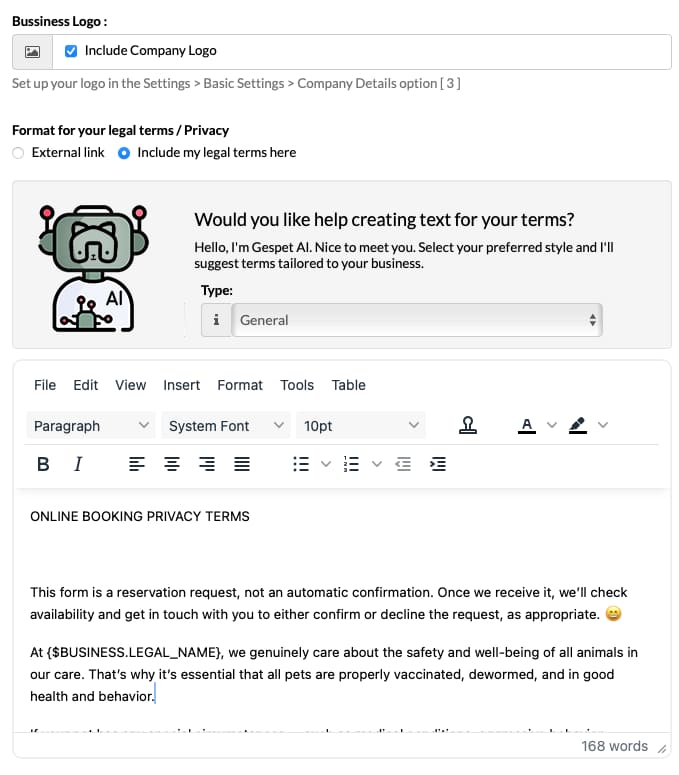
If you have the Communication, Marketing and CRM module, additional configuration options will be enabled and you’ll be able to add your business logo, which will appear above the form.
This lets you personalize it, giving it a more professional look and boosting your business presence.
So your clients can read and accept them before sending you their request. You can choose whether you prefer to:
Use an external link, for example to your website or to a cloud document (Google Drive or similar).
When your clients click it, that external link will open in their web browser.
Write your terms here. When your clients
click, the terms will appear directly within the
form in a pop-up window, without needing to open a
separate tab or page.
This is especially useful if you don’t have a
website and prefer to write your terms directly.
You can style them however you like, since it includes a professional editor that lets you customize formatting and also provides ready-made template texts.
If you have the Marketing module, you’ll also see
the Gespet AI option — Gespet’s assistant that
offers recommendations.
It suggests polished wording for your terms that
you can edit or use as you wish, saving you a great
deal of time.
Important:
The texts, templates, models, or drafting suggestions provided are for guidance only and are supplied for informational purposes. They do not constitute legal advice, nor do they replace the specific professional assessment that each case may require.
The user is solely responsible for reviewing, adapting, and verifying that any legal content they use complies with the applicable regulations for their activity, jurisdiction, and particular circumstances. It is strongly recommended to consult a lawyer or other qualified professional before implementing any legal text or policy.
Gespet assumes no liability for how the suggested texts are used, nor for any errors, omissions, or consequences resulting from their application without proper professional review.
GESPET TIPS & ADVICE
When is it better to use one option or the other?
The option to write the terms in the editor is especially recommended:
If you don’t have a website, or you do have one but want to use different terms specifically for the form
If you don’t want a separate window to open and prefer to display the terms directly within the form
If you want to use Gespet AI recommendations
If you want the quickest option
If you already have a website and want to use the same terms for the form, it may be more practical to use an external link to those terms to avoid duplicating them.
In the form, users will see these checkboxes to tick or select. They must accept your terms before requesting a booking; otherwise, the form will not be sent.

This acceptance or “signature” of the terms is recorded in
the software within the client’s profile: View >
clients > select client > right-side menu
PRIVACY, where you can check it whenever needed.
Legally, they CANNOT be pre-checked or forced to “yes” without user action. The user must actively choose to tick them, because to comply with the law, consent must be explicit, freely given, and unambiguous.
When communications are strictly necessary to provide the service (replying to an enquiry, confirming a booking/appointment, operational notices, etc.), you do NOT need a consent checkbox. This is based on the performance of pre-contractual measures (art. 6.1.b GDPR) and the controller’s legitimate interest.
In other words, there’s no option to accept or refuse those communications, because without them the service cannot be provided.
However, it’s different for other types of communications
that are not strictly necessary.
In those cases,
explicit consent from the client/user is required to send
them.
For that reason, the form includes a specific checkbox so the client can indicate whether they wish to receive such communications from you.
It cannot be mandatory and cannot be pre-selected. The client/user decides freely, and the form must work exactly the same even if they don’t tick it.
If you force them to tick it, the consent would not be legally valid and could be considered forced consent (non-compliance with GDPR arts. 4, 6 and 7).
This is because contacting you or requesting registration or an online booking cannot legally imply accepting to receive advertising, promotions, etc. from you, so that checkbox cannot be mandatory.
Gespet recommendation: If you’d like more detailed information about this or need to understand how it applies specifically to your business, we recommend consulting data protection regulations or a specialist advisor/lawyer in data protection.
Read more information
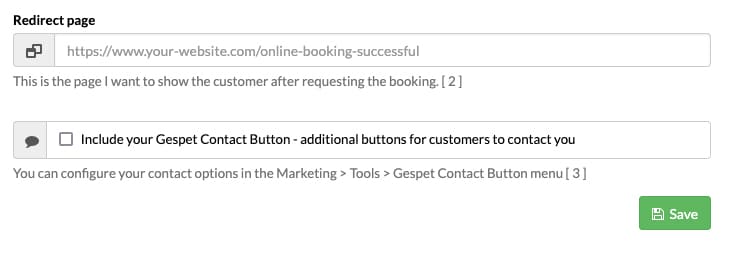
If you wish, you can configure the form’s redirect page — in other words, the destination page shown to the user after clicking the “Request booking/appointment” button.
If you leave it blank, once finished the user will stay on the same page and won’t be redirected elsewhere.
It’s very straightforward:
In the “Redirect page” option, enter the URL of the page you want to display
Click Save.
This option is very useful if you want to show users, for example, a page with more information about stay/service conditions, a page with payment details, opening hours, or anything else you choose.
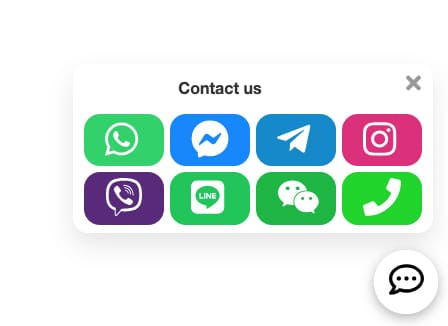
If you have the Communication, Marketing and CRM module, additional configuration options will be enabled and you’ll be able to include the Gespet Contact Button.
A button will appear so clients or people interested in your business can get in touch with you.
They’ll be able to choose their preferred contact method from the ones you’ve configured. For example, if you’ve set up WhatsApp, Line and Phone, they’ll be able to message or call you.
GESPET TIPS & ADVICE
Why is it essential to have visible contact options on your website/blog/social media?
Direct contact options on your website are much more than a simple feature — they’re a powerful tool to boost sales and enhance user experience. When a potential customer can resolve doubts instantly, their trust grows, and so do the chances they’ll complete the purchase, booking, or action they’re considering.
Imagine a client who is about to request an appointment with your business but has a question. If they can reach you instantly, they’re far more likely to complete the booking with you instead of leaving to look elsewhere for that service. Not only are you providing fast support, you’re also delivering a personalized experience that leaves a positive, memorable impression.
In short: clear and accessible contact options help you win customers, increase satisfaction, and strengthen your brand.
The booking request system does not include payment options since, until you confirm the booking, it's just a request from the customer. However, you can include payment options or show more information to the customer after the request process.
As mentioned before, you can configure the page to which the user should be redirected after filling out the form.
Some common options include showing the user:
A payment page for them to pay a booking fee
Important information and considerations before the stay (vaccinations, deworming, etc.) and what they should bring (passport/veterinary record, food, collar, etc.)
If the owner takes the animal to the facility/grooming/clinic -> Information on how to get there, a map, and the animals' entry schedule
If there's a home pickup service -> Information about the pickup service, schedule, etc.
A page with advertising for other services your business offers that might interest them
Access to any restricted area of your website, if available: customer area, access to the webcam if you have monitoring service, etc.
Simply, you can take them back to the booking page or show them the home page. You decide.
The software complies with the International Standard ISO 8601:
24-hour format for hours
YYYY-MM-DD format for dates
You cannot change this date/time format.
It may happen that a customer does not receive an email you send from the software. This could be due to:
The customer's email address is misspelled or incomplete
The customer's email address no longer exists
The customer's email inbox is full
The customer's email provider marked the email as Spam or promotions, etc.
In this case, the email won't be in the inbox but in the Spam/promotions/etc. folder. (And even if the customer has configured their email provider to automatically empty those folders, they might not see the email because it has already been deleted.)
In the first three cases, you can't do anything to prevent it. If the customer doesn't enter a correct address or their inbox is full, that email won't reach its destination. (Whether you send it from the software or directly from your email customer.)
Note: When adding a customer's email address to the software, make sure it's complete and error-free.
In the fourth case, to prevent an email provider from marking emails as Spam/Promotions, etc., there's a simple solution: add that address to your contacts.
For example, if you add your friend Juan's email address to your contacts, the email customer interprets all emails you receive from Juan as desired messages and stores them in your inbox.
However, it's very likely that an email customer identifies as unwanted or Spam the emails received from unknown users, especially if sent by an automatic system (like our automatic online booking confirmation system).
It's advisable that you also add our addresses to your contacts to receive all our emails and notifications: [email protected] and [email protected]
Note: This recommendation is very useful, even for emails you send directly from your email customer (not from the software). If a user adds your email address to their contacts, the emails you send will appear in their inbox.
For all emails sent from the software, we use all available anti-spam measures to prevent emails from being marked as Spam or junk mail: application of DNS modifications at the domain level to ensure correct email sending and reception, DNS records known as SPF and DKIM specific with RSA keys to prevent identity theft and prevent emails from being marked as spam.
In addition, we use secure and encrypted protocols (SSL/TLS) to ensure the privacy of all emails sent.
For emails sent from the software, what percentage of emails are received by customers?
Currently, our email delivery rate is over 96%, and the remaining 4% is due to the following errors in this order:
The destination email inbox is full
The destination email inbox is not available
The destination email address is incorrect
The destination email address no longer exists
If you have any doubts or want to ask us anything about this, contact us so we can provide you with more information.
TAGS:
pet hotel online booking configuration | pet grooming online booking configuration | animal hotel online booking configuration | pet nursery online booking configuration | pet training online booking configuration| pet kennel online booking configuration | pet grooming online appointment settings