Pet Business Scheduling Software: Business Hours, Holidays and Non-Working Days
We would like to introduce a set of features that we are confident will make a real difference to the way you work.
Your schedule, business hours and closed days are now connected
In a pet business, certain situations happen almost every day: someone tries to enter a booking outside your opening hours, an appointment falls on a public holiday, a delivery is scheduled on a closed day or a pet hotel check-out needs to be reviewed more carefully.
Until now, many of these situations depended on your team's memory, manually checking the calendar or correcting an error after it had already happened.
With the new Business Hours, Non-Working Days and Planner settings, Gespet takes another step towards helping you work with a smarter, clearer schedule that matches the reality of your business.
The goal is simple: fewer mistakes, fewer manual checks and greater peace of mind for your team.
In Settings > Business hours, you can configure your business hours
and non-working days.
Everything starts with a clearer configuration area
Gespet now includes one unified configuration area for managing:

Business hours
when each business area is actually open

Non-working days
holidays, closures, vacations, maintenance or special days

Planner
the visual time range displayed in your calendars and schedules
This allows your pet hotel, daycare, grooming salon, veterinary clinic, dog training center, pet shop or breeding business to work with much more consistent rules.
Best of all, the settings do not stay isolated: Gespet uses this information in the planner, daily work screens, date selectors and Online Bookings.
Business hours: continuous, split, flexible or strict
Every business works differently. Some grooming salons open from 9:00 to 14:00 and from 16:00 to 20:00. Some pet hotels accept check-ins only in the morning and check-outs in the afternoon. Veterinary clinics may have very specific hours, while dog training centers may operate only on certain days.
That is why you can now configure your business hours much more precisely:
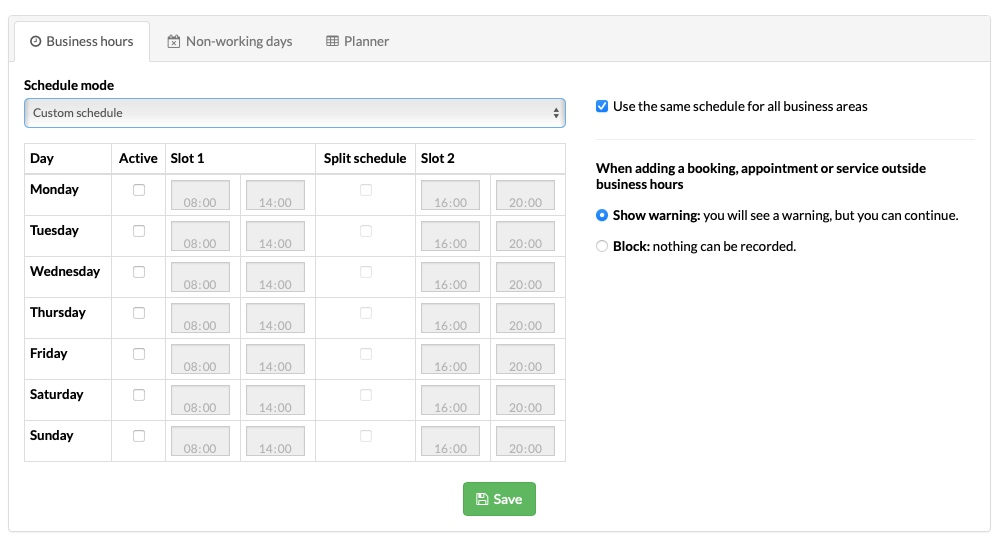
Configure them by business area, because your veterinary clinic may have different hours from your grooming salon.
Enable or disable specific days of the week.
Define continuous hours, such as 09:00 to 18:00.
Define split hours, such as 08:00 to 14:00 and 16:00 to 20:00.
Use the same schedule for every business area or configure each app separately.
What happens when you try to add an appointment or booking outside that area's
business hours?
You decide whether you want to:

Show a warning
and still allow the appointment or booking

Or block it
so it cannot be added
There is no single ideal option for every business. Each company works differently, so we give you the flexibility to choose the configuration that best fits your way of working.
We provide the tools, but you decide how to use them in your business.
Warning option: this option is ideal for businesses that need more flexibility. For example:
Pet hotels that normally do not accept check-ins or check-outs on Sundays but make exceptions during the high season.
Veterinary clinics that do not work outside their usual hours, except in specific cases such as emergencies, follow-up appointments or surgery reviews.
Grooming salons that may accept an occasional service outside their usual hours on special dates.
In these cases, Gespet warns you, but you can continue; it does not block the action.
Blocking option:
This is ideal for businesses that follow strict hours and do not want to allow bookings, appointments or services outside their defined days and times.
It helps prevent mistakes such as entering an appointment on a non-working day, accepting a check-in outside business hours or scheduling a service while the business is closed.
You can choose the option that best fits your business and change it whenever you need to.
This difference is important. Some businesses need flexibility, while others prefer a strict rule to prevent any mistake. In Gespet, you can choose how you want to work.
Non-working days: holidays, closures and exceptions under control
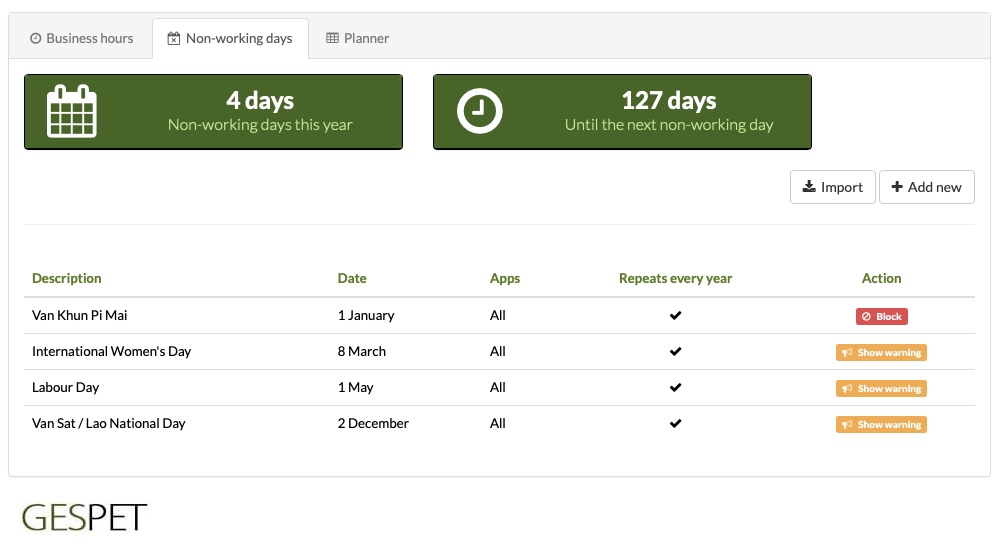
You can also configure non-working days for each business area. For example:
You can mark 1 August as a non-working day for your grooming salon because you will not be providing grooming services that day.
At the same time, you may still provide veterinary services or allow check-ins and check-outs at your pet hotel.
This way, each area can have its own configuration based on how it actually operates.
And if the non-working days are the same for every area, you do not have to configure them one by one. Set them up in one area and they can easily be copied to the others.
Examples of non-working days:

Public holiday

Rest day

Maintenance / works

Vacation
The configuration is highly flexible: you can define non-working days as exact dates, dates that repeat every year or date ranges. For example:
December 25 every year.
August 15 every year.
September 1 to 15 for a vacation closure.
A specific day for facility maintenance.
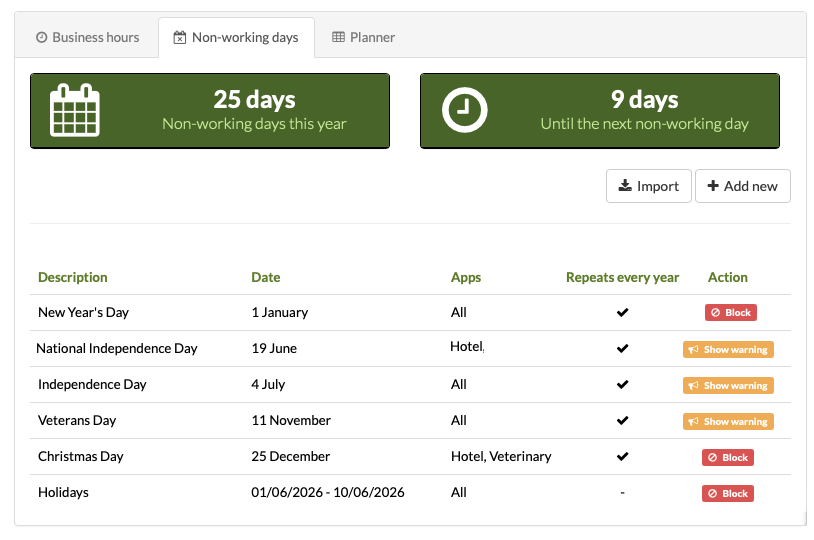
You can also decide whether a non-working day applies to every area of your business or only to some of them. For example, you could close the grooming salon for one day while keeping the pet hotel open, or block pet shop deliveries on a specific date while continuing to provide other services.
What happens with pet hotel stays?
Pet hotel stays can last several days, so the check-in date, check-out date or an intermediate day may be a non-working day or public holiday.
For example:
A stay runs from July 1 to July 30.
You have configured July 7 as a non-working day.
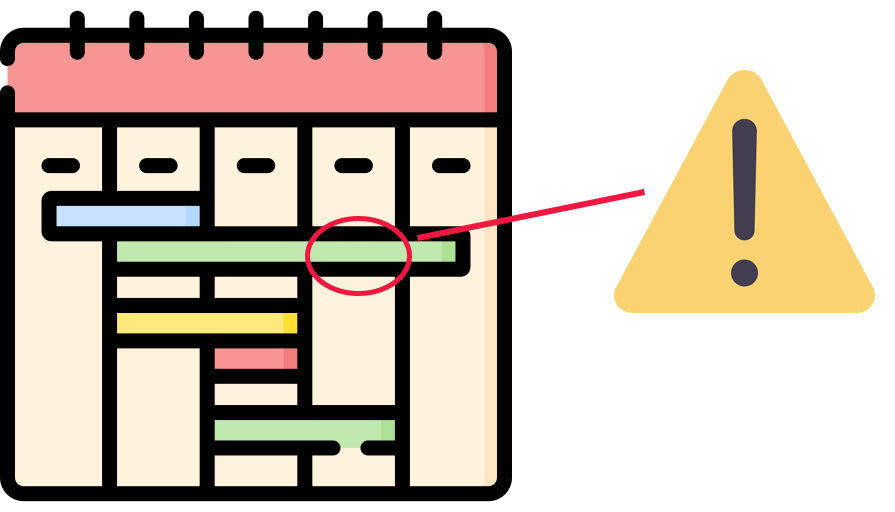
In this case, Gespet displays a warning to let you know that the stay includes a day you have defined as non-working.
Gespet AI included
To save you valuable time, simply select the country and Gespet will automatically configure that country's fixed public holidays.
Improved planner visibility
In addition to configuring the time range you want to see on screen, such as 09:00 to 21:00, you can now see your actual working hours as well.
For example, if your working hours are 09:00 to 14:00 and 16:30 to 20:00, your working time will be highlighted in a different color.
The same applies to non-working days: they are marked in the planner so you can see them before moving an appointment, changing a booking or scheduling a delivery.
Warnings and blocks on daily work screens too
This update is not limited to the calendar. It also affects the screens where you work every day.
For example:
Pet hotel and daycare bookings, check-ins and check-outs.
Grooming and dog training appointments and services.
Veterinary appointments, services and consultations.
Pet shop sales deliveries and incoming orders.
Puppy deliveries.
Pet transport planning and delivery date changes.
If you select a non-working date or a time outside the configured business hours, you will see a warning or the action will be blocked, depending on the setting you chose.
This reduces common errors: an appointment on a closed day, a pet hotel check-out outside business hours, a pet shop delivery on a public holiday or a puppy delivery on a day when the business is closed.
This update also applies to online bookings and appointments
We have also applied this update to your online booking and appointment page. As you already know, you can configure business hours by area so customers can choose the days and times available when requesting services, appointments, check-ins or check-outs. For example:
For pet hotel check-ins, customers can choose Monday to Friday from 12:30 to 17:00.
For check-outs, customers can choose Monday to Sunday from 12:00 to 14:30 and 16:00 to 18:00.
For grooming appointments, customers can choose a morning or afternoon slot without selecting a specific time.
For veterinary services, customers can choose any time because the service is available 24/7.
You can now also decide whether customers should be blocked from requesting a booking, appointment, check-in or check-out on a date you have configured as non-working.
If you are not using the online booking and appointment system yet, you can activate it from your account under Settings > Online Bookings.
It is completely free, you can start using it immediately and it is available for Pet Hotel, Daycare, Grooming, Dog Training and Veterinary modules.
You can also configure it around your business needs. Do your
customers speak different languages? No problem. The online
booking and appointment system is available in 22 languages.
You can add it to your website, blog or online shop, share it
on social media, send it directly to customers or use a fully
customizable QR code with the design you prefer.
Online bookings save you time, improve your business image and give customers a more convenient, modern and professional way to request your services.
Customers love being able to do it online, at any time and from any device. More organization, more control and fewer errors.
With this new non-working-day, holiday and business-hours configuration, Gespet helps you work in a more organized way that reflects the reality of your business.
You can decide whether to keep flexibility with warnings or work more strictly with blocks.
You choose how to manage your business. You can find more information in your account under Settings > Online Bookings.
Learn more about online bookings
Every business is unique, and Gespet gives you the flexibility you need
You know your business better than anyone, which is why you need flexibility when managing it.
Gespet is used in 59 countries by professional users exclusively from the pet
industry.
The feedback shared by members of the Gespet team, professionals
working around the world, gives us an impressive global view of the pet business.
Better knowledge leads to better processes and better solutions adapted to the
real needs of professionals.
Some industries, including the pet industry, had been overlooked and were thought not to need professional business solutions because they seemed simple to run.
We know from the inside that running a pet business requires dedication, effort and careful management. It needs high-quality, advanced solutions that are fully specialized for the industry.
A simple calendar is not enough. Providing a quality service to customers and their pets is a double responsibility that requires careful management and highly optimized processes to make the best use of your valuable time.
Thanks to everyone who sends us suggestions and feedback every day, these new features are now available. They are not just about "colouring parts of the day in a calendar" or "showing a warning"; they provide professional management, highly precise team organization, fewer errors and the time savings that a professional like you needs:

Fewer errors
when creating appointments, services and deliveries

More clarity
in planners and calendars

Fewer manual checks
of hours and holidays

A better customer experience
especially with Online Bookings

A more professional image
because the system works according to your rules

Greater peace of mind
for a team that can rely on the schedule
1. Can I configure my pet business's actual working hours in Gespet?
2. Can I block appointments, bookings or services on non-working days?
3. Do non-working days also affect online bookings?
4. Can I import predefined holidays or non-working days?
5. Which pet business areas does this update cover?
6. What type of schedule is best for a pet business?
Try Gespet for free
Did you find it interesting?
If you have any questions, you want to propose that we write a help guide or a post on a topic or you just want to chat with us, don't hesitate. We are delighted to talk with you and get your opinion.

LANGUAGE
CATEGORIES
POPULAR POST
Pet Business Scheduling Software: Business Hours, Holidays and Non-Working Days
New regional settings in Gespet
Black Friday Ideas for Pet Businesses
New features included and user suggestions
The all-in-one agenda every breeder needs
Differences between full invoice and simplified invoice
Electronic invoicing with TicketBAI and Verifactu
New features included and user suggestions
Configurable online booking form and GDPR
FOLLOW
JOIN OUR TEAM
Follow us on social media and join our mailing list for advice and tips to run your pet-care business
TAGS:
business hours
non-working days
pet business scheduling
online bookings
pet business software
appointment planner
pet business working calendar
pet hotel daycare grooming veterinary software