Schedule automatic reminders for your pet hotel bookings
We’d like to introduce a new feature we have added to our software for pet hotel businesses.
Would you like to remind your clients that they have a booking at your pet hotel in three days, for example? Or notify them several times — say, ten, seven and two days beforehand?
Useful, isn’t it? But sending so many reminder emails manually takes a lot of time.
Now, you can do it automatically. When you add a new booking, you can schedule all the reminders you want and the software will automatically send them the specified day.
Add reminders when you make a booking

Schedule reminders for pet hotel bookings
Without leaving the booking screen, you can add automatic reminders. Choose the delivery date by entering a custom date or using the date calculator. If you select “15 days before”, the software calculates the date 15 days before the booking and fills it in for you.
You can also select the time you want it to be sent from the Time dropdown and if the customer has multiple email addresses, you can choose which one you want to send it to. You can even receive a copy in your email, if you want.
Privacy and consent
Do you want to see a warning when you are adding an automatic reminder for a customer who has not agreed to receive communications from you? It’s very simple, in the configuration you only have to select if you want to see this notification when setting new reminders up.
By clicking on “View details”, you directly access that customer’s file to view/modify their privacy information.
Configure the appearance of the automatic reminders that your customers will see
You can configure the appearance of the emails that your customers will receive for the automatic reminder notification, customising the logo, the name of your business, and the information that will appear in the email footer.
In addition, if you frequently send some text, additional information, …, you can save it as a “template” and thus, you will not have to write it every time.
Also, you can preview the appearance of the auto reminders emails, how they will look with your data, logo and “template” text. Very useful, right?
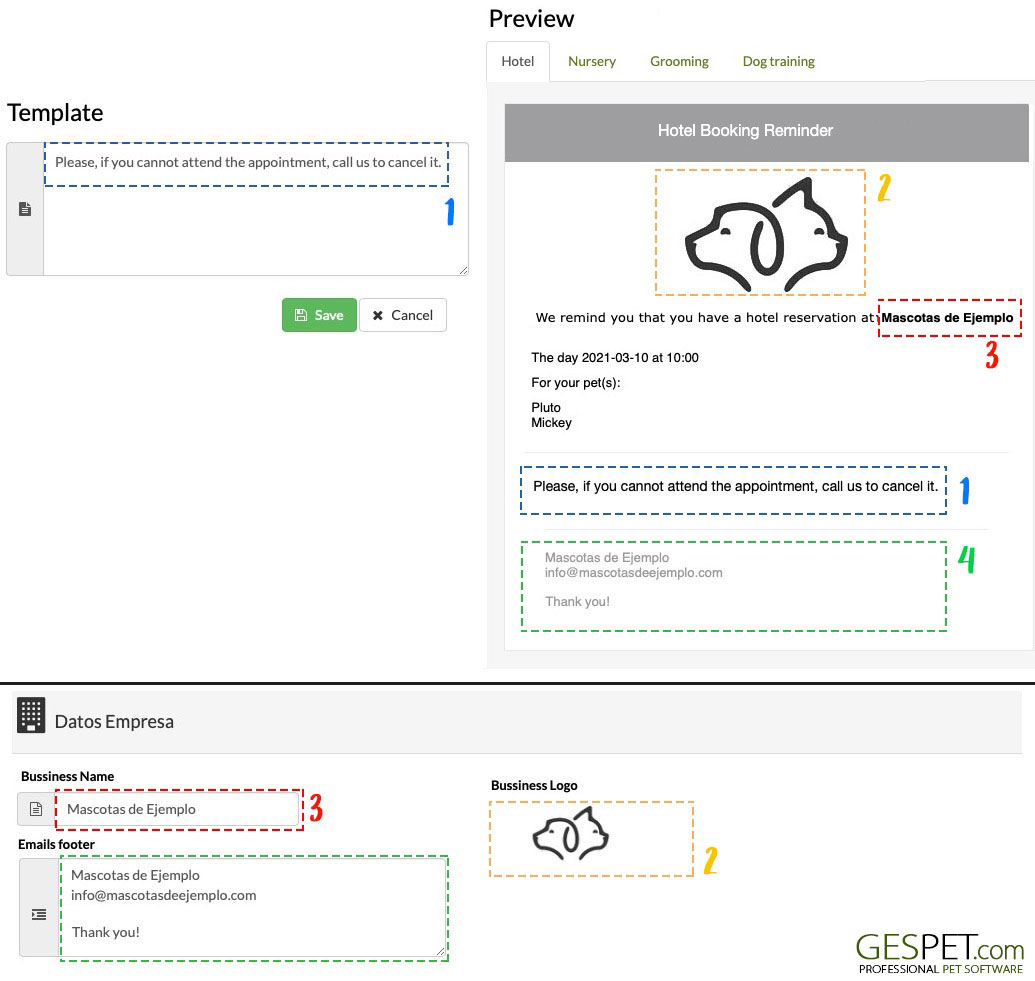
Configure the appearance of booking auto-reminders
Did you find it interesting?
If you have any questions, you want to propose that we write a help guide or a post on a topic or you just want to chat with us, don't hesitate. We are delighted to talk with you and get your opinion.