
Now you can configure your legal terms faster in the client registration form
Today we’re bringing you a very practical improvement many of you have been asking for: the ability to configure legal and privacy terms directly inside the new client and pet registration form.
As you know, Gespet includes a feature that allows your clients to send you their details and their pets’ information quickly and easily — and have everything automatically saved in your software.
This saves you a huge amount of time day-to-day: fewer calls, fewer messages, fewer “can you send me your details on WhatsApp?”, and fewer transcription mistakes. Clients fill out the form once, and you have everything neatly organised from the very beginning.
You can share this form via link, send it by email, post it on your social media, or even share a QR code so clients can scan it on their phone and complete their registration instantly.

Share the link
Share the QR code

On your social media

On your Website/Blog
You can also customise the QR code with fun icons. Clients love these little details, and they help reinforce your brand image.
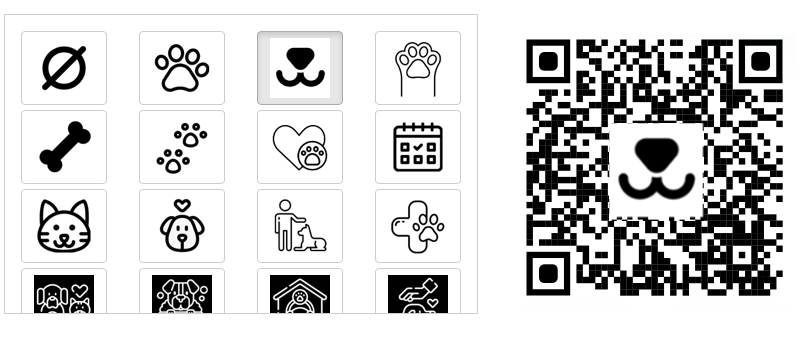
Customise your QR code with fun icons. When clients scan it, they’ll instantly see your client and pet registration form.
Your client can complete their registration from their phone, tablet or computer, whenever it suits them best — before visiting your centre, from home, or even at reception by scanning the QR code.
As soon as they submit the form, their data is automatically recorded in Gespet: client and pets, ready for you to create bookings, appointments, profiles, records, communications and anything else you need.
Until now, this form only allowed you to include an external link to your legal or privacy terms, for example if they were hosted on your website or in a document such as Google Drive.
Many of you told us you don’t have a website and prefer configuring everything directly inside Gespet. So… done! We always try to implement your suggestions, because you’re a key part of the Gespet team.
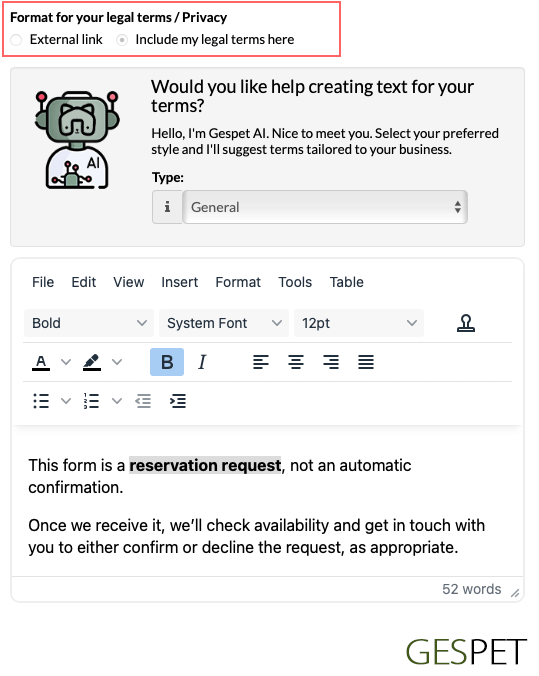
You can still use an external link if you want. But now you can also write your terms directly inside Gespet, without relying on external pages.
We’ve also added a text editor so you can format your content. You can change font size, colours, add links and much more so your text looks professional and aligned with your brand.

Use an external link or the Gespet editor with GespetAI suggestions.
Of course, it also includes text templates — one of our users’ favourite features. Business details are filled in automatically, helping you save time, avoid typing errors and keep everything up to date.
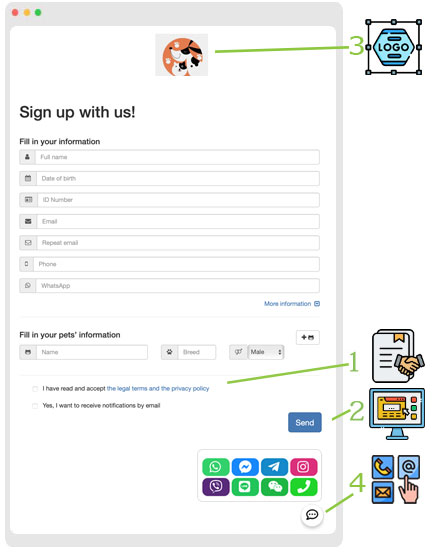
They will appear in the form (1) for the customer to read and accept, and this will be recorded in their profile so you can review it whenever needed
You can customize:
Your logo (3)
The terms and conditions for the client to accept (1)
Whether you want the Gespet Contact Button to appear, a button that allows clients to contact you if they have any questions during the process. (4).
You can customize which contact options you want to display (phone, WhatsApp, social media, email ...)
If you want to save even more time and enhance your business image, the CRM, Marketing and Communication module is your perfect ally.
It includes many powerful features, such as this client and pet registration tool that can save you hours of work. And of course it also includes GespetAI — Gespet’s artificial intelligence that helps you exactly when you need it. In this case, it can automatically suggest legal and privacy texts for your client and pet registration form.
You can choose between a general version or one adapted to GDPR and instantly receive an elegant, professional suggestion.
Use it as-is, expand it with extra information or customise it completely to suit your needs.
Small details that make a big difference
Allowing clients to read and accept your terms directly inside the registration form — without leaving the process — greatly improves user experience, builds trust and helps you meet your information obligations.
If you’d like to try it, simply go to the Marketing, CRM and Communication module, open Tools > Gespet Connector Registration, and in Advanced Settings you’ll find this new option.
From any module, including the main screen or daily planner, you can also
use the button below to send the registration link via WhatsApp or email so
clients can fill in their details.
Why should clients accept terms before submitting their data?
With Gespet it’s very easy to set up and it helps you in several legal and operational ways:
1. Legal protection. It records that the client has read and accepted your terms before sending their information. This can protect you in disputes or misunderstandings because you can prove the terms were visible and voluntarily accepted.
2. Fewer misunderstandings. By accepting them beforehand, you reduce follow-up questions, awkward situations and liability issues.
3. Professional image and trust. You convey organisation, transparency and professionalism from the very first interaction and stand out from competitors.
4. Time savings. Fewer back-and-forth messages, fewer corrections and fewer manual data entry issues.
Frequently asked questions
Is Gespet’s client and pet registration form free?
Yes. It’s
included in the CRM, Marketing and Communication module and you can use it
at no cost so clients can quickly send their details and their pets’
information.
Can I send the form by link or QR before the first visit?
Yes.
Anytime you like. You can share it via link, social media or QR so clients
can complete their registration from home or at reception.
Which languages is the form available in?
It’s available in
multiple languages so you can choose whichever you need.
Summary
Gespet includes a form so clients can easily register themselves and their pets.
You can share it via link, social media or QR and clients can complete it from any device.
Data is automatically saved in the software, saving you significant time.
You can include legal and privacy terms inside the form.
You can use an external link or Gespet’s built-in editor.
The editor lets you customise fonts, colours, lists, links, emojis and more.
Includes template-text that auto-fill information to save time and prevent errors.
With GespetAI you can generate elegant, professional legal and privacy texts instantly.
Requesting prior acceptance improves clarity, client experience and legal protection.
Try it free
Did you find it interesting?
If you have any questions, you want to propose that we write a help guide or a post on a topic or you just want to chat with us, don't hesitate. We are delighted to talk with you and get your opinion.

LANGUAGE
CATEGORIES
POPULAR POST
Pet Business Scheduling Software: Business Hours, Holidays and Non-Working Days
New regional settings in Gespet
Black Friday Ideas for Pet Businesses
New features included and user suggestions
The all-in-one agenda every breeder needs
Differences between full invoice and simplified invoice
Electronic invoicing with TicketBAI and Verifactu
New features included and user suggestions
Configurable online booking form and GDPR
FOLLOW
JOIN OUR TEAM
Follow us on social media and join our mailing list for advice and tips to run your pet-care business
TAGS:
Client and pet registration
Client and pet registration form
Pet legal terms
Pet privacy
Pet GDPR
Marketing for pet businesses